Hardware#
You can run the software on any non RPi hardware, but you won't be able to control the pins without a device supporting GPIO control. To build a functional machine, you can take this reference and customize it to your needs. This offers a good starting point for what you might need. How exactly you will build your CocktailBerry is completely up to you.
Example Machine#
The following components were used within the showcase for the Machines (CocktailBerry v1/v2/v3):
- 1x Raspberry Pi 3b+ (or newer Model 4)
- 1x 5-inch Touch Screen or 7-inch Touch Screen for the Raspberry Pi
- Official Touch Screen also works
- 1x Micro SD-Card (16-32 GB is enough, depending on what else you want to store)
- 1x 5V Power supply for the Raspberry Pi 3 or Raspberry Pi 4
- 1-2x 8 Channel or other RPi (needs 3.3V Logic Level, 5V will NOT WORK!!!) Relay-Boards depending on pump count (important to have 5V input control)
- Alternative: Motor shields AZDelivery or Adafruit 4 DC or 2 Stepper Motors per shield, has reversion build in
- 6-24x Pumps, it should be food safe, examples are:
- membrane pump or this one
- peristaltic pump
- 1x Power supply for the pumps
- 5-10m Food safe hose/tubes for the pumps
- Female to Female jumper wires
- Some wires, Hex-Standoffs, Screws and other small parts for mounting
- Your custom build machine casing
- Optional: HDMI and USB cables for small space builds
- Optional: A good converter (using USB ones may result in too high voltage loss) if you only want one power source
- Optional: USB C or Micro USB open cable
Payment Service#
If you want to use the NFC-Reader functionality with the payment service, you will need at least two additional NFC readers and another Pi setup:
- 2x USB RFID Reader, other ones might not work out of the box
- Compatible NFC tags (e.g., MIFARE Classic or in Blue)
- 1x Raspberry Pi 3b+ (or newer Model 4)
- Additional monitor + mouse + keyboard or another touchscreen; see above
Teams Dashboard#
The following components were used within the showcase for the Teams Dashboard:
- 1x Raspberry Pi 3b+ (or newer Model 4, Model 5)
- 1x 7-inch Touch Screen
- 1x Display Casing
- 1x Micro SD-Card
- 1x 5V Power supply for the Raspberry Pi 3, Pi 4 or Pi 5
Possible Basic Circuit#
The following picture shows a possible circuit for CocktailBerry. The Raspberry Pi will provide too little power / current to operate the pumps. You have to use two power circuits, one for powering the Raspberry Pi and one for the pumps. The pump circuit will most likely be 12 or 24 V. You can either use two different power supplies or use a step down converter for the RPi. The RPi will control a relay, MOSFET or another electrical switch via the GPIO output.
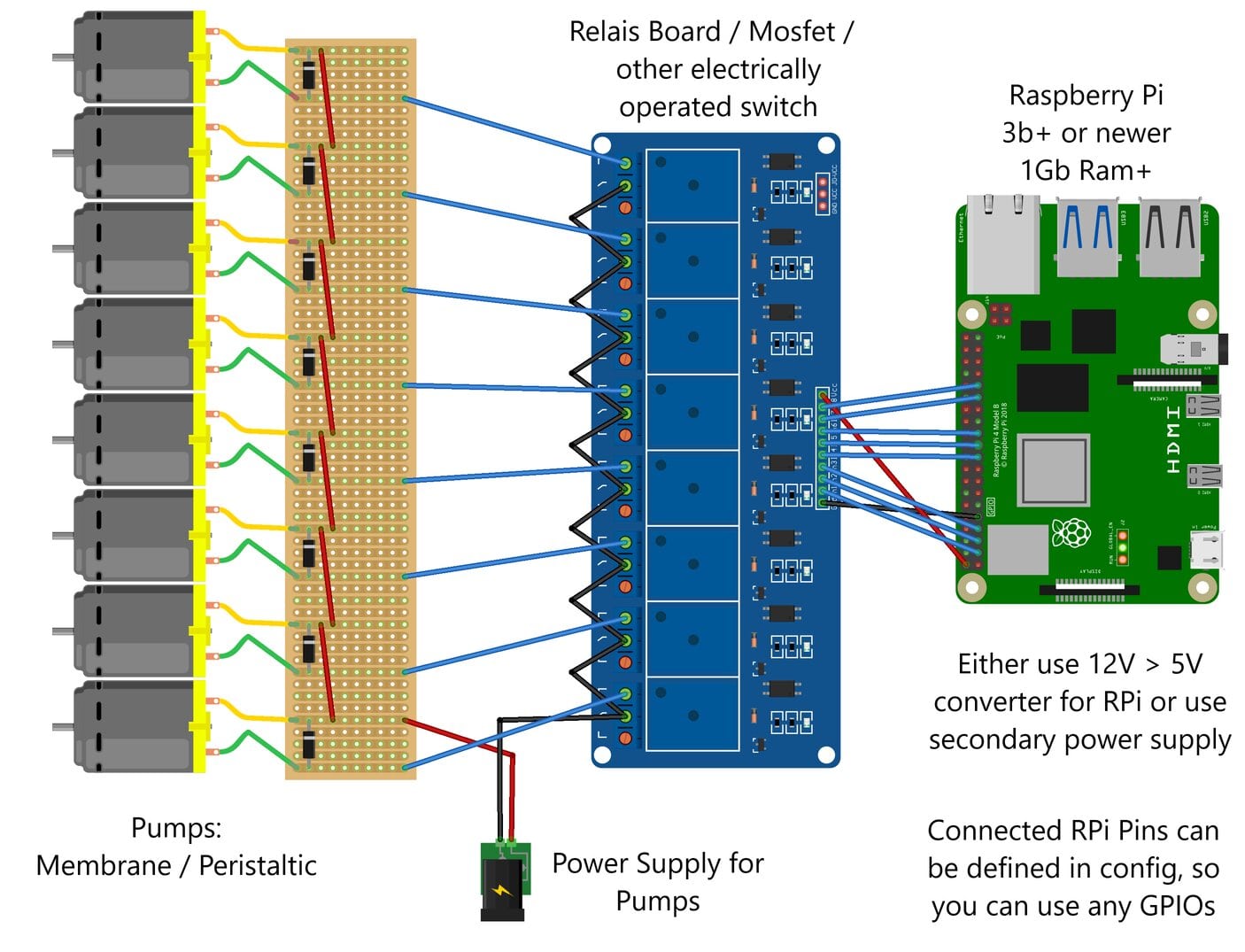
You can use any of the GPIOs of the RPi, the connected pump to that pin can be defined in the config. The switch will then turn the pump on or off via the RPi. How you will build your CocktailBerry is still completely up to you. The only restriction by the software is that the GPIO pins are turned on / off via the RPi.
Custom PCBs or STLs#
Help Wanted
We are currently working on a custom PCB for even easier connection and cable management. If you are interested in helping reach out to us. With your help, we can make this project even better.
When the PCB is in an acceptable state, there will also be a new design fitting for that PCB. In the future we are planning to provide the files here or a link to their origin.